No Products in the Cart

Do you want to remove a screen protector because it's full of scratches, has small bubbles, or because you want to apply a new glass screen protector? Especially with a broken screen protector or a tempered glass screen protector, people are afraid of damaging the display or touchscreen.
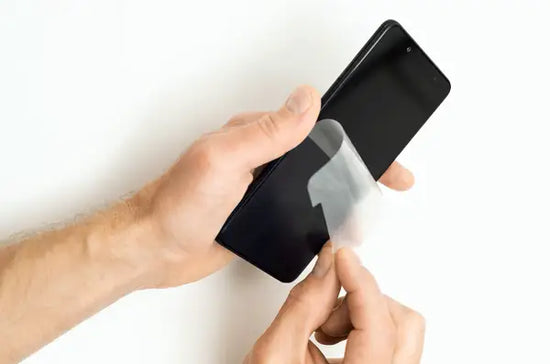
Fortunately, you can remove a screen protector without risk, as long as you work calmly and follow the correct steps. In this article, we explain how to remove a screen protector and how you can easily do this with a wooden toothpick.
Before you start removing a screen protector, good preparation is important. I recommend placing your smartphone on a flat surface and making sure your hands are clean and dry. It's most convenient to have a microfiber cloth, a wooden toothpick, a plastic card, and possibly a piece of adhesive tape or tape ready.
This allows you to work carefully without affecting the special coating of the display. It's better not to use metal objects like a screwdriver, as this can quickly cause scratches or other damage.
You ideally need:
Our experts recommend removing a screen protector with a wooden toothpick. This method works safely for both glass and plastic screen protectors and reduces the chance of damaging the screen. Follow the steps below to carefully remove the screen protector.
This prevents the device from shifting while removing the screen protector.
If the screen protector is broken, it's wise to first tape over the glass.
A wooden toothpick is safer than a screwdriver or metal object.
This prevents shards from a glass screen protector.
After that, you can immediately apply a new screen protector for the best protection.
A broken screen protector requires extra attention, especially when removing a tempered glass screen protector. Due to cracks and small shards, the protector can fall apart more easily during removal.
Therefore, our experts recommend first placing a piece of tape over the entire screen protector. This helps keep glass pieces together and allows you to work more safely. Afterwards, you can again use a toothpick or plastic card to loosen a corner. This way, you can remove the broken protector more safely.
The same mistakes are often made when removing a screen protector. This makes the work take longer or causes unnecessary damage to the screen. Pulling too quickly or working directly with hard objects, in particular, causes problems. Therefore, we recommend working calmly and checking what happens step by step.
Common mistakes are:
Our experts recommend always starting at a corner and using a wooden toothpick or a piece of tape. This way, you can carefully loosen the screen protector without directly applying pressure to the screen. Then, slowly peel off the protector instead of pulling hard in one go. This is especially important when removing a tempered glass screen protector, as glass can crack more easily. Work gently along the edges and use a plastic card if necessary to assist further.
After removing a screen protector, any adhesive residue or stubborn glue residue may remain visible on the display. In most cases, you can remove this with a microfiber cloth or a small microfiber cloth. Gently rub the screen so as not to damage the coating. Then check that the display is completely clean and dry before applying a new screen protector. This prevents air bubbles and ensures the new protector adheres better.
Yes, you can, as long as the screen is clean and there is no dust, adhesive residue, or small shards left. Our experts recommend first carefully checking whether the display is undamaged after removal. Then you can place a new one, such as a new glass screen protector or another new protector that fits your device. Make sure to apply the new screen protector on a clean surface. This way, you get more out of your protection and prevent having to start over.
Rick Bloemkolk
Within R2B Store, I focus on technology, gadgets, and gaming accessories. I regularly test new products to discover which innovations make daily life smarter and more practical.